
Drizzle ORM + Supabase — A Production-Safe DB Workflow
 Jerome Na
The Problem: ORM Migration Risk
You add a column to a production database. The auto-migration tool executes unexpected SQL. The service goes down.
Schema changes are the most nerve-wracking moment in any deployment. Storida combines Drizzle ORM’s developer experience with Supabase CLI’s production safety to solve this.
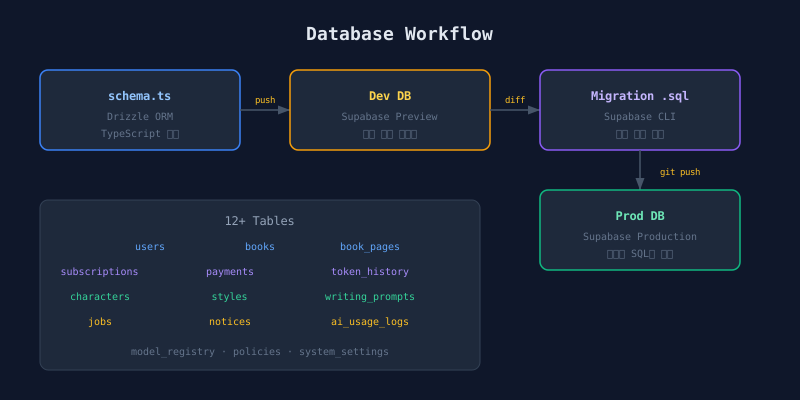
Workflow Overview
┌──────────────┐     ┌──────────────┐     ┌──────────────┐
│ schema.ts    │────▶│   dev DB     │────▶│ Migration    │
│ (Drizzle)    │ push│  (Supabase)  │ diff│    .sql      │
└──────────────┘     └──────────────┘     └──────┬───────┘
                                                  │ git push
                                           ┌──────▼───────┐
                                           │  prod DB     │
                                           │ (Supabase)   │
                                           └──────────────┘
In development, Drizzle applies schemas directly. In production, only reviewed SQL migrations execute.
Environment Separation
| Environment | Git Branch | Supabase Branch | Purpose |
|---|---|---|---|
| Development | dev |
Preview | Schema experiments, fast iteration |
| Production | main |
Production | Reviewed migrations only |
Supabase supports Git branch linking. Push to dev and the Preview DB updates automatically. Merge to main and Production DB applies the migration.
Three-Step Schema Change Process
Step 1: Define Schema in Drizzle
All schemas are written in TypeScript. This enables type inference and autocompletion.
The contents table tracks each piece of generated content: a unique ID, the owning user (FK to users with cascade delete), a title, a status field (defaulting to PENDING), total page count, generation phase and progress indicators, and a creation timestamp. Each field is defined in TypeScript with full type inference.
Drizzle schema definitions map 1:1 to SQL DDL. No proprietary DSL like Prisma. You can predict the generated SQL.
Step 2: Push to Dev DB
cd packages/backend
npm run db:push   # Drizzle → dev DB direct apply
db:push calculates the diff between the current schema and the database, then applies it immediately. No migration files generated. Fast iteration. Development environment only.
Step 3: Generate Migration SQL
After testing on the dev DB, extract migration SQL with Supabase CLI.
supabase db diff -f add_content_type
# → supabase/migrations/20260319_add_content_type.sql
This SQL file becomes the subject of code review. A human reviews the auto-generated SQL before it touches production. Unsafe DDL like DROP COLUMN gets caught.
Database Schema: 12+ Tables
Storida has 12+ tables. The core relationships look like this.
users ─────┬── contents ──── content_pages
           │      └───── content_assets ── characters
           ├── subscriptions
           ├── payments
           ├── credit_logs
           └── credit_purchases

prompt_templates (writing styles)
styles (illustration styles)
ai_models (AI models)
announcements ── announcement_reads
policies (terms of service)
jobs (Job Queue)
usage_records (token usage logs)
app_config (system configuration)
ID Type Decision: UUID vs Text
users.id and managers.id use text type, not uuid. Firebase UIDs are 28-character alphanumeric strings. The original design used uuid. When migrating to Firebase Auth, every FK column referencing users.id had to change type simultaneously.
The lesson: tables referencing external auth system IDs need a flexible type. Use text.
Forbidden Rules
Three rules prevent production incidents.
| Forbidden | Reason |
|---|---|
| Modify tables via Supabase Dashboard | Breaks sync with Drizzle schema |
Run db:push on production DB |
Applies changes without migration history |
| Manually edit applied migration files | Conflicts with already-applied migrations |
Break any of these and the schema source of truth fractures. Recovery is painful.
Seed Data Management
Initial data (plans, default characters, system settings) lives in src/db/seed.ts. Run with npm run db:seed. Idempotency is guaranteed via ON CONFLICT DO NOTHING.
The seed script inserts initial plan tiers (free through premium), default characters, and system settings. Each insert uses an ON CONFLICT DO NOTHING clause for idempotency.
Run it once. Run it ten times. Same result. No duplicate records. No errors.
Summary
Drizzle ORM is SQL-first. You never wonder “what SQL is this ORM generating?” Combine it with Supabase CLI’s db diff and branch-based auto-deployment. Development speed and production safety coexist.
Next: the dynamic prompt system for Claude and Gemini.