
AI Prompt Engineering — Dynamic Prompt System and AI Analysis Pipeline
 Jerome Na
The Problem: Hardcoded Prompts
Prompts change constantly in an AI SaaS. Adjust the tone. Fix a constraint. Add a new style. Every change required a code deployment.
The operations team needed to modify prompts instantly. A template variable system and AI-powered analysis pipelines solved this.
Prompt Architecture
Prompts fall into two categories.
| Type | AI Model | Managed In | Purpose |
|---|---|---|---|
| Writing prompt | Claude Sonnet 4 | Admin > System Settings + Writing Styles | Storybook text generation |
| Image prompt | Gemini 2.0 Flash | Admin > Style Management | Illustration image generation |
Template Variable System
Design
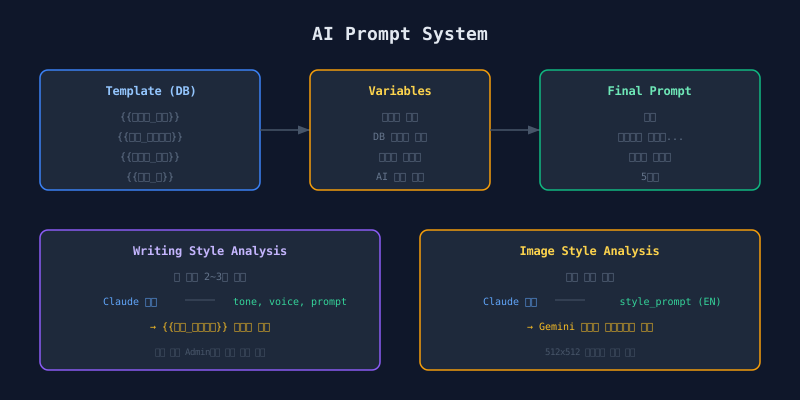
Prompt templates are stored in the Admin’s system settings as markdown. They use {{variable_name}} placeholders. At generation time, placeholders are replaced with real values.
┌───────────────┐     ┌───────────────┐     ┌───────────────┐
│ Template (DB) │────▶│ Variable      │────▶│ Final Prompt  │
│ {{hero_name}} │     │ Collection    │     │ "Toto"        │
│ {{style}}     │     │ User input    │     │ Actual style  │
└───────────────┘     │ DB lookups    │     │ text...       │
                      └───────────────┘     └───────────────┘
Variable List
| Variable | Source | Description |
|---|---|---|
{{hero_name}} |
User input | Story protagonist name |
{{story_situation}} |
User input | Story background situation |
{{character_type}} |
characters table | Character type tag |
{{character_desc}} |
characters table | Character traits |
{{writing_prompt}} |
prompt_templates table | AI-analyzed style prompt |
{{page_count}} |
User input | Number of pages to generate |
{{name_max_chars}} |
plans table | Plan-specific character limit |
Interpolation Function
The interpolation function uses simple regex replacement: find all {{variable_name}} placeholders in the template and substitute the corresponding value from a key-value map. Missing keys resolve to empty strings.
The key insight: all variables come from the database. Edit a template in Admin. It takes effect on the next generation. No deployment required.
AI Analysis Pipeline: Writing Styles
Paste writing samples. AI extracts the style automatically.
Flow
Admin Input                   Claude Analysis           Result
┌──────────────┐              ┌──────────────┐         ┌──────────────┐
│ 2-3 text     │─── POST ───▶│ Claude       │────────▶│ display_name │
│ samples      │  /analyze   │ Sonnet 4     │         │ tone         │
└──────────────┘              └──────────────┘         │ narrative    │
                                                       │ generated    │
                                                       │ _prompt      │
                                                       └──────────────┘
Instead of an admin typing “fable-like moralistic tone,” they paste 2-3 actual text samples in that style. Claude analyzes the samples. It extracts tone, narrative voice, and stylistic features. It generates a generated_prompt that other AI models can reference.
This generated_prompt fills the {{writing_prompt}} variable in the template.
AI Analysis Pipeline: Image Styles
Image style management uses a 3-step workflow.
Three Steps
| Step | Input | Output |
|---|---|---|
| 1. Description | Text description (min 10 chars) | — |
| 2. AI Analysis | Claude auto-processes | English style_prompt, keywords, negative_keywords |
| 3. Preview | Gemini auto-processes | 512x512 sample image |
AI Analysis Output Structure
{
  "name": "Watercolor Storybook",
  "style_prompt": "watercolor illustration, soft and gentle,
    pastel colors, children's book style, warm lighting,
    hand-painted texture",
  "keywords": ["watercolor", "soft", "pastel", "warm"],
  "negative_keywords": ["realistic", "dark", "scary"]
}
An admin describes a style in plain language. Claude converts it into an English image generation prompt. This style_prompt feeds directly into Gemini image generation.
Final Image Prompt Assembly
The final image prompt combines scene description with style information.
Generate a children's book illustration for page 1 of 5.
The image must be in portrait orientation (3:4 aspect ratio).
Do NOT include any text, letters, words, or numbers.

Style: watercolor illustration, soft and gentle, pastel colors...
Keywords: watercolor, soft, pastel, children, warm
Avoid: realistic, dark, scary

Scene description:
Toto wandered through the forest, looking around nervously.
"Mom, where are you?"
Plan-Based Dynamic Limits
Same template, different limits per plan.
At runtime, the backend reads the user’s plan limits (name length, situation length, max page count) and builds a Zod validation schema dynamically. The incoming request body is validated against these plan-specific constraints before any generation begins.
These limits also feed into prompt variables. The AI generates content of appropriate length for each plan tier.
End-to-End Flow
User Input (Web)
    │
    ▼
Backend Validation ←── Dynamic limits from plans table
    │
    ▼
Job Registration (includes plan limits)
    │
    ▼
Scheduler Processing
    ├── Fetch writing template from app_config
    ├── Fetch style prompt from prompt_templates
    ├── Variable interpolation → final prompt
    ├── Claude API call → text generation
    │
    ├── Fetch style info from styles table
    ├── Assemble per-scene image prompts
    └── Gemini API call → image generation
Design Tradeoffs
| Decision | Pros | Cons |
|---|---|---|
| DB-stored prompts | Instant changes, no deployment | Needs DB fallback on outage |
| AI auto-analysis | Non-experts can register styles | AI analysis cost per style |
| Regex variable substitution | Simple and predictable | No conditional logic |
The choice is between simplicity and expressiveness. Jinja2 or Handlebars enable conditional branching. They also make prompt debugging harder. Storida chose simple substitution. When complex branching is needed, register a separate template.
Next: migrating authentication from Supabase Auth to Firebase.