
Auth Migration — From Supabase Auth to Firebase Authentication
 Jerome Na
Why Migrate
Storida started with Supabase Auth. DB, Storage, Auth — all on one platform. Then JenaLab’s other services (Armo, Contexta) needed unified authentication. Supabase Auth hit its limits.
Firebase Auth through a single project (shared-auth) serves all JenaLab services. One signup. Access everywhere.
Supabase Auth vs Firebase Auth
| Criteria | Supabase Auth | Firebase Auth |
|---|---|---|
| Multi-project auth | Independent per project | Single project shared across services |
| Google OAuth | Supported | Native support + simple setup |
| Admin SDK | Limited | Full user CRUD, custom claims |
| Mobile SDK | Limited | Native Flutter/Swift/Kotlin |
Firebase wins on cross-service identity. That decided the migration.
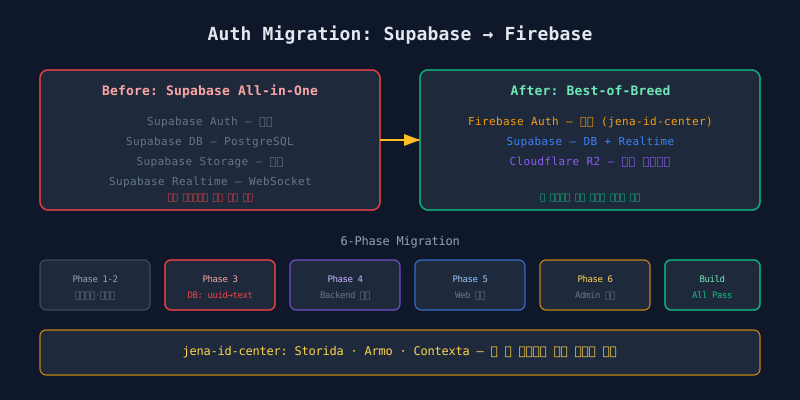
Migration Strategy: 6 Phases
No big-bang replacement. Six phases with build verification after each.
Phase 1  Environment variables
Phase 2  Dependency installation
Phase 3  DB schema change          ← most dangerous
Phase 4  Backend auth swap
Phase 5  Web auth swap
Phase 6  Admin auth swap
Each phase produces a buildable, testable state. If Phase 4 breaks, Phase 3 is still intact.
Phase 3: DB Schema Change — The Danger Zone
The users.id column type changes. Supabase Auth uses UUID. Firebase Auth uses 28-character alphanumeric strings.
The migration changes the users.id column from uuid to text, along with 9+ foreign key columns across the schema that reference it. Every table with a user_id column must be altered in lockstep.
Three risks in this change:
- FK constraints must be dropped temporarily: Type changes require dropping and recreating foreign keys
- Existing data compatibility: UUID data auto-converts to text, but the format differs from new Firebase UIDs
- Rollback complexity: Converting text back to uuid risks data loss
This phase ran on the dev DB first. Migration SQL was generated, reviewed, then applied to production.
Phase 4: Backend Auth Middleware Swap
The auth middleware swap replaced a Supabase getUser() call (which makes a network request) with Firebase’s verifyIdToken() (which validates the JWT locally). Auth latency dropped.
The middleware signature stays the same. req.user.userId still exists. Downstream code needs no changes.
Phase 5: Web Client Auth
The Web app uses Firebase’s client SDK.
The Web client uses Firebase’s standard client SDK methods: email/password sign-in, Google OAuth via popup, and an auth state listener that retrieves the ID token whenever the user’s session changes.
Supabase Auth used cookie-based sessions. Firebase uses client-side token management. The token goes to Backend via Authorization: Bearer {token} headers.
New Role Distribution
After extracting auth to Firebase, each platform handles what it does best.
┌─────────────────────────────────────────┐
│              Firebase                    │
│  Authentication (shared-auth)        │
│  ID Token issuance · User management    │
└────────────────────┬────────────────────┘
                     │
┌────────────────────▼────────────────────┐
│              Supabase                    │
│  PostgreSQL  · Realtime                  │
└─────────────────────────────────────────┘
                     │
┌────────────────────▼────────────────────┐
│           Cloudflare R2                  │
│  Image storage                           │
└─────────────────────────────────────────┘
Firebase handles identity. Supabase handles data and real-time events. R2 handles file storage. No platform carries responsibilities outside its strength.
Error Message Translation
Firebase error codes are machine-readable but user-hostile. A translation layer maps them to localized messages.
A translation function maps Firebase error codes (like auth/email-already-in-use or auth/too-many-requests) to localized, user-friendly messages. Unknown codes fall back to a generic error message.
Every Firebase error the user can trigger gets a human-readable message. The fallback handles unknown codes gracefully.
Lessons
1. Use Text Type for External Auth IDs
External auth systems define their own ID format. UUID today, alphanumeric string tomorrow. text absorbs any format. uuid forces a migration when the auth provider changes.
2. Phase-by-Phase Build Verification
A 6-phase migration with build checks after each phase caught 3 issues that would have been invisible in a single deployment. Each phase is a checkpoint. Roll back to the last working phase if needed.
3. Avoid Single-Platform Dependency
Supabase for Auth + DB + Storage seemed convenient. Migration cost grew exponentially when one piece needed to change. Separate concerns across platforms from the start. The initial setup cost is lower than the migration cost.
Next: implementing the Toss Payments subscription billing system.