
Multi-Character System — Ensuring Image Consistency with Claude Vision
 Jerome Na
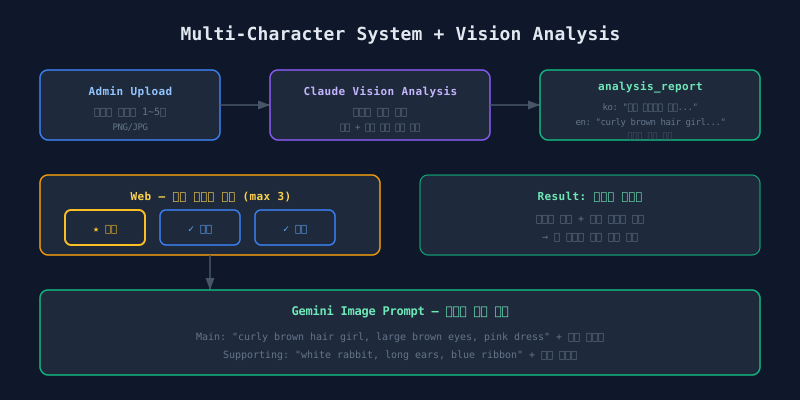
The Problem: Characters Change Every Page
Page 1 shows a brown-haired girl. Page 3 turns her blonde. Page 5 renders a different person entirely. This is a persistent failure mode in AI image generation.
The old system passed character images as “reference images” to Gemini. No guidance on what to extract from those images. Gemini interpreted them differently each time.
Solution: Image to Text to Prompt Injection
Admin uploads images (up to 5)
         |
         v
Claude Vision analysis -------> Structured description (English)
                                 |
                                 v
Inject into image prompt ------> Gemini image generation
Convert images to text. Claude Vision analyzes character images and generates an English description. This description gets injected into the Gemini image prompt. Text is deterministic. Reference images are ambiguous.
DB Schema Changes
characters Table
A JSONB analysis report field was added to the characters table. It stores bilingual descriptions (Korean and English) generated by Claude Vision.
content_assets Table
The content-to-character association table gained two fields: a custom name override and a protagonist flag. This table manages the many-to-many relationship between contents and characters, and the protagonist flag separates the lead from supporting characters.
Claude Vision Analysis API
POST /api/assets/analyze
Body: { image_urls: string[] }  (1-5 images)
Response: { description_ko, description_en }
The prompt instructs Claude to extract visual features that an image generation AI can reproduce consistently. Hair color, eye shape, clothing, approximate age, distinguishing accessories.
Example response:
{
  "description_ko": "A Korean description for admin review",
  "description_en": "A young girl with curly brown hair,
    large brown eyes, round cheeks, wearing a pink dress
    and sneakers, approximately 6-7 years old"
}
The Korean description is for admin review and editing. The English description feeds directly into the Gemini prompt.
Multi-Character Request Validation
Before
The request accepted a single character ID.
After
The request accepts up to 3 characters, each with an optional custom name and a protagonist flag.
Validation enforces exactly one protagonist using a schema-level refinement. Zero protagonists fails. Two protagonists fails. The constraint is strict.
Scheduler: Injecting Character Info into Prompts
Text Generation (Claude)
The writing prompt template includes structured character information: the protagonist’s name, type, and appearance description (from the Korean analysis report), followed by supporting character entries with their names and descriptions. These variables are injected into the prompt at generation time.
Image Generation (Gemini)
Main character: A young girl with curly brown hair,
  large brown eyes, round cheeks, wearing a pink dress
  and sneakers. Her name is "Toto".

Supporting character: A small white rabbit with long ears
  and a blue ribbon. Name: "Mimi".

[Reference images attached]

Style: watercolor illustration, soft and gentle...

Scene: Toto and Mimi chased butterflies in the forest.
analysis_report.description_en gets injected as text. The image AI reproduces the same visual features on every page. The difference from reference-images-only is significant.
Reference images tell Gemini “something like this.” Text descriptions tell Gemini “brown curly hair, pink dress, brown eyes, round cheeks.” Specificity wins.
Web UI: Multi-Selection Interface
+-----------+  +-----------+  +-----------+
| * Toto    |  | + Mimi    |  | + Bunchi  |
| (lead)    |  | (support) |  | (support) |
| gold ring |  | blue ring |  | blue ring |
+-----------+  +-----------+  +-----------+
- First selection = protagonist (star icon + gold ring)
- Additional selections (up to 2) = supporting characters (check icon + blue ring)
- Toggle behavior: click to select, click again to deselect
The first-selected-is-protagonist rule eliminates a separate role assignment step. Users pick their lead character first, then add supporting cast.
Limitations and Mitigations
Claude Vision analysis has boundaries.
| Limitation | Description | Mitigation |
|---|---|---|
| Abstract characters | Fantasy creatures get vague descriptions | Admin edits analysis text |
| Multi-angle inconsistency | 5 images from different angles produce conflicting descriptions | Use consistent reference angles |
| Color accuracy | Subtle color differences are hard to convey in text | Admin fine-tunes color terms |
The analysis result is a draft. Admins review and edit via a textarea field. AI generates the first pass. Humans refine.
Results
| Metric | Before | After |
|---|---|---|
| Character consistency | Appearance shifts between pages | Core features (hair color, clothing) maintained |
| Character count | 1 only | Up to 3 |
| Prompt quality | Reference images only | Text description + images combined |
| Admin workload | Manual feature descriptions | AI analysis + editing |
The combination of structured text descriptions and reference images gives Gemini two channels of information. Text anchors the key features. Images provide the style reference. Neither alone is sufficient. Together, they produce consistent characters across pages.
Next: the token-based pricing system design.