
jenaMemory — Building a macOS Menu Bar App Without Xcode
 Jerome Na
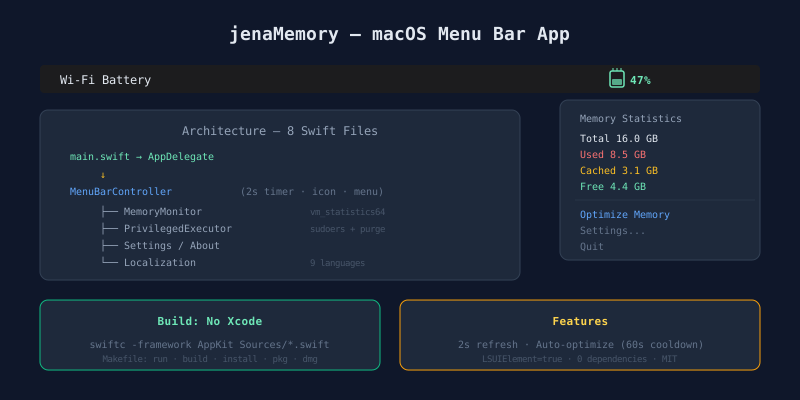
A number in the menu bar
A single number appears in the macOS menu bar. Free memory percentage. Updates every two seconds. Click for detailed stats. Click again to flush the cache.
jenaMemory does exactly this. Eight Swift files. No Xcode project. Compiled with swiftc.
Why build it
Memory monitor apps flood the App Store. Most share two problems.
- Heavy. The app watching memory consumes memory.
- Noisy. Subscription prompts, premium locks, ads.
One number and one button. That was the requirement. So we built it.
Design decisions
AppKit over SwiftUI
SwiftUI stabilized for macOS from version 13. But for menu bar apps, AppKit fits better.
| Criteria | SwiftUI | AppKit |
|---|---|---|
| NSStatusItem control | Needs wrapping | Native |
| Dynamic menu refresh | Cumbersome | Direct |
| Bundle size | Larger | Minimal |
| macOS 12 support | Fragile | Stable |
A menu bar app has minimal UI. SwiftUI’s declarative advantage does not apply here. AppKit gives direct control with less weight.
No Xcode project
swiftc -framework AppKit -O Sources/*.swift -o jenaMemory
One line builds the app. Xcode project files (.xcodeproj) produce unreadable Git diffs. Configuration changes hide inside XML. A Makefile keeps everything in plain text.
make run      # Build and launch
make build    # Create .app bundle
make install  # Install to ~/Applications
make pkg      # Create .pkg installer
make dmg      # Create .dmg disk image
Architecture: 8 files, clear roles
┌──────────────────────────────────────────────┐
│  main.swift → AppDelegate                    │
│       │                                      │
│       ▼                                      │
│  MenuBarController (main controller)         │
│       │                                      │
│       ├── MemoryMonitor (system memory)      │
│       ├── PrivilegedExecutor (admin tasks)   │
│       ├── SettingsWindowController           │
│       ├── AboutWindowController              │
│       └── Localization (9 languages)         │
└──────────────────────────────────────────────┘
Eight files. Intentional. Layered architecture or MVVM would be overkill for a menu bar utility. Files are split by role. No abstraction layers.
MenuBarController — the center
This file runs the app. It creates the NSStatusItem, refreshes memory every two seconds, and builds the menu.
The menu bar icon is a RAM chip shape. Fill level changes with memory usage. Light and dark mode adapt automatically. All of this fits in 16 by 18 pixels.
MemoryMonitor — Darwin Mach API direct
Memory stats come from Darwin’s vm_statistics64, not Foundation wrappers. Foundation adds overhead. For a function called every two seconds, overhead accumulates.
The calculation model matches macOS Activity Monitor.
| Metric | Formula |
|---|---|
| Used | Wired + Active + Compressed |
| Cached | Inactive (reclaimable on demand) |
| Available | Free + Inactive |
| Usage % | Used / Total × 100 |
Inactive memory counts as “available.” macOS manages Inactive like a cache. When a new process needs memory, the system reclaims it immediately.
PrivilegedExecutor — two-stage escalation
Memory optimization runs the system purge command. It requires administrator privileges.
First run:
  AppleScript → system password dialog → install sudoers rule → run purge

Subsequent runs:
  Check sudoers rule → run purge without password
One password entry on first use. After that, silent execution. The sudoers rule permits only the specific command. It does not grant full sudo access.
Temporary files are cleaned with defer. Leftover temp files in privilege-related code create security risks.
Auto-optimization
When free memory drops below a threshold, optimization runs automatically. A 60-second cooldown prevents loops. Without it, memory hovering near the threshold triggers repeated optimization.
Check memory every 2 seconds
  │
  ├── Free > threshold → wait
  └── Free ≤ threshold
       ├── Last run < 60 seconds ago → wait
       └── 60 seconds elapsed → run optimization
Nine languages
Korean, English, Chinese, Japanese, Spanish, German, French, Russian, Hindi.
No .strings files or .lproj bundles. All strings live in a Swift enum. The Xcode localization system is overkill for a menu bar app.
Changing the language refreshes menus, settings, and the about window instantly. No restart needed. NotificationCenter propagates the change. Each controller redraws its UI.
No Dock icon
LSUIElement = true hides the app from the Dock. A menu bar app has no reason to occupy Dock space. It lives in the menu bar. It receives focus only when a settings window opens. This follows the pattern of macOS system utilities.
Distribution
make dmg    # Disk image (.dmg)
make pkg    # Package installer (.pkg)
Both formats build with a single Makefile target. Code signing and notarization need separate handling, but the build itself is automated.
Takeaway
A menu bar utility needs little. AppKit. Mach API. Makefile. Eight files. Zero dependencies. Zero Xcode project files.
When the tool does not need complexity, reducing the toolchain is a design choice.
jenaMemory is MIT open source.