
JenaNote — Building a WYSIWYG Markdown Editor with NSDocument
 Jerome Na
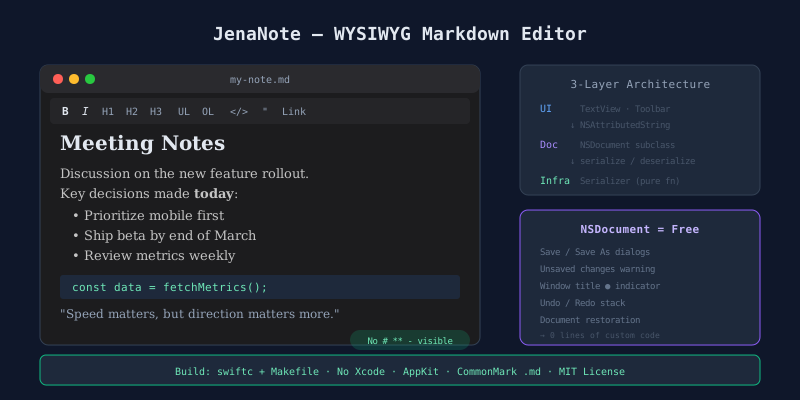
An editor where markdown symbols disappear
Type **bold** and the asterisks vanish. Only bold remains. Type # Heading and the hash disappears. A large heading appears. Save the file. It is .md. Open it in another markdown viewer. The formatting matches.
JenaNote is a native macOS editor that does exactly this.
The gap between existing tools
Markdown editors split into two camps.
- Syntax-visible (Obsidian, VS Code). You must know markdown syntax.
#,**,-appear on screen. - Rich text (TextEdit, Notes). WYSIWYG, but cannot save as
.md.
Typora filled this gap. After it went commercial, an alternative was needed. JenaNote fills that space under the MIT license.
| Criteria | JenaNote | Typora | Obsidian | TextEdit |
|---|---|---|---|---|
| WYSIWYG | Yes | Yes | No | Yes |
| .md save | Yes | Yes | Yes | No |
| Syntax hidden | Yes | Partial | No | N/A |
| macOS native | Yes | Yes | No | Yes |
| Open source | MIT | Paid | Paid | System |
Starting point: NSDocument
macOS provides a standard pattern for document-based apps. NSDocument. Subclass it and these come free:
- Save / Save As dialogs
- Window title change dot (●)
- “Do you want to save?” confirmation sheet before closing
- Document restoration after app restart
- Undo / Redo stack
Building these manually takes hundreds of lines. NSDocument takes zero.
Decision: Subclass NSDocument. Write no custom file management code.
Three-layer architecture
┌─────────────────────────────────────────┐
│  UI Layer                               │
│  Text View · Format Toolbar · VC        │
└────────────────┬────────────────────────┘
                 │ read / write attributed string
┌────────────────▼────────────────────────┐
│  Document Layer                         │
│  Markdown Document (NSDocument)         │
└────────────────┬────────────────────────┘
                 │ serialize / deserialize
┌────────────────▼────────────────────────┐
│  Infrastructure Layer                   │
│  Markdown Serializer                    │
│  (NSAttributedString ↔ CommonMark .md)  │
└─────────────────────────────────────────┘
Dependencies flow downward only. Three rules:
- UI does not call the serializer directly
- Document does not depend on AppKit UI components
- Serializer is a pure function. No state.
Core decision: NSAttributedString as internal representation
The choice of internal representation defines the entire architecture of a markdown editor.
| Option | Advantage | Disadvantage |
|---|---|---|
| Markdown AST | Full CommonMark support | Requires sync layer with NSTextView |
| NSAttributedString | Direct NSTextView integration, auto Undo | Complex nesting has limits |
NSAttributedString won. NSTextView handles this format natively. Store bold, italic, heading, and list as attributes. The screen updates immediately. NSUndoManager handles Undo/Redo automatically.
The tradeoff exists. Deeply nested markdown structures (code block inside a list inside a blockquote) are hard to represent perfectly. For a note-taking app, this constraint is acceptable.
Data flow
Opening a file
Double-click .md in Finder
  → NSDocumentController creates Document instance
  → Serializer: markdown text → NSAttributedString
  → View controller loads into text view
  → Formatted text appears. No symbols visible.
Applying formatting
Cmd+B or toolbar B click
  → View controller calls format command
  → Text storage attribute changes (undo registered)
  → Screen updates instantly. No symbols shown.
Saving
Cmd+S
  → NSDocument handles save (AppKit automatic)
  → Serializer: NSAttributedString → CommonMark text
  → Written to disk as .md file
  → Window title ● indicator removed
The serializer: bidirectional conversion
The serializer does two things.
Parsing: Takes markdown text from a .md file and converts it to NSAttributedString. **text** becomes “text” with a bold attribute.
Serialization: Reads NSAttributedString attributes and converts them to CommonMark text. A bold attribute wraps the text in **.
This module is a pure function. Input in, output out. No stored state. Imports only Foundation. Easy to test.
Following macOS standards
Menus and shortcuts
The macOS Responder Chain works as-is. No custom menu management code needed.
- File menu (Save, Open) → NSDocument handles automatically
- Edit menu (Undo, Copy, Paste) → NSTextView handles automatically
- Format menu (Bold, Italic) → Only custom actions to wire
Custom code is needed only for formatting actions. AppKit handles the rest.
Unsaved changes warning
Close a window with unsaved changes. A confirmation sheet appears: “Save”, “Don’t Save”, “Cancel”. NSDocument provides this automatically. Build it manually and you must call the warning from every path — close, quit, new document. Miss one path, lose data.
Build: no Xcode
Same approach as jenaMemory. Makefile + swiftc.
make run      # Build + launch
make build    # Create .app bundle
make install  # Install to ~/Applications
make dmg      # Distribution disk image
make pkg      # Package installer
Swift files compile into a single binary. No Xcode project file means clean Git diffs. Configuration changes live in one line of the Makefile.
Takeaway
A WYSIWYG markdown editor needs three things.
- NSDocument — Delegate file management to macOS
- NSAttributedString — Align internal representation with screen display
- Bidirectional serializer — Handle conversion to and from
.md
AppKit handles the rest. Do not rebuild what the platform already provides. That is the design principle of a native app.
JenaNote is MIT open source.