
JenaImage — A macOS Image Viewer That Eliminates the Finder-Preview Gap
 Jerome Na
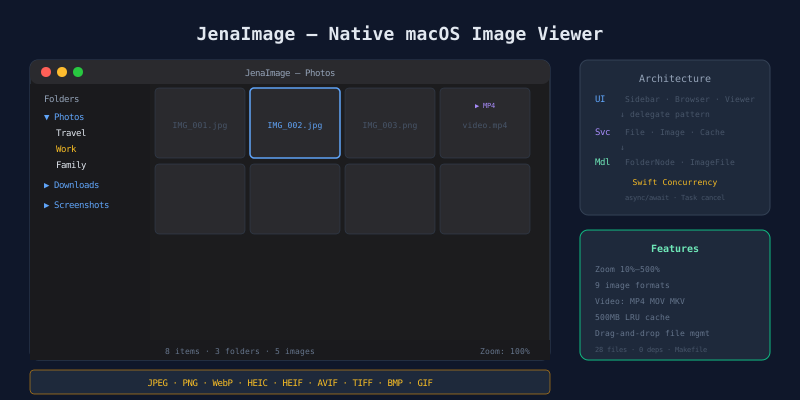
Managing images requires two apps
Browse folders. Finder. View an image. Preview. Move to another folder. Back to Finder. Convert the format. Yet another app.
Image work always bounces between apps. JenaImage removes that bounce. Folder sidebar, thumbnail grid, image viewer, video playback, and format conversion live in one window.
Design decisions
Why AppKit
This app depends on three core components.
| Component | AppKit | SwiftUI |
|---|---|---|
| Folder tree | NSOutlineView — stable | OutlineGroup — unstable with large trees |
| Image grid | NSCollectionView — proven performance | LazyVGrid — scroll stutter reported |
| Zoom/pan viewer | NSScrollView magnification | ScrollView — limited fine control |
AppKit wins on all three. Even targeting macOS 14+, SwiftUI has not matured in these areas.
Swift Concurrency over GCD
An image viewer runs many async operations. Folder enumeration, thumbnail generation, large image loading, format conversion. All must run off the main thread.
Swift Concurrency (async/await) over GCD. One reason: task cancellation. Switching folders must immediately stop generating thumbnails for the previous folder. GCD requires manual cancellation logic. Swift Concurrency solves it with Task.isCancelled.
Architecture: three zones in one window
┌──────────────────────────────────────────────────────┐
│  MainWindowController (NSSplitViewController)        │
├──────────┬───────────────────────────────────────────┤
│ Sidebar  │  Browser (grid) ←→ Viewer (detail)        │
│ Folder   │  ┌─────────────────────────────────────┐  │
│ tree     │  │ Folder + image thumbnails            │  │
│          │  │ or                                   │  │
│ Drag &   │  │ Image viewer + thumbnail strip       │  │
│ drop     │  └─────────────────────────────────────┘  │
└──────────┴───────────────────────────────────────────┘
NSSplitViewController manages the layout. Left: folder sidebar. Right: switches between browser (grid) and viewer (detail). MainWindowController acts as mediator.
Dependency rules
UI (ViewController) → Service → Model
Reverse dependencies are forbidden. Cross-feature communication uses the Delegate pattern only. No NotificationCenter. No Combine. Type safety and traceable flow.
File structure
Sources/
├── app/        Main window, menus, preferences, help
├── sidebar/    Folder tree (NSOutlineView)
├── browser/    Image grid (NSCollectionView)
├── viewer/     Image viewer, zoom, thumbnail strip, video
├── services/   File ops, image processing, cache, security
└── models/     Folder node, image file, format definitions
Thumbnail cache: memory only, no disk
Scrolling through 1,000+ images must not stutter. A thumbnail cache is essential.
NSCache-based memory cache. 500MB limit. LRU eviction policy. macOS detects memory pressure and NSCache purges automatically.
No disk cache. ImageIO generates thumbnails fast enough. Adding disk cache introduces invalidation complexity. Files get moved or deleted. The cache falls out of sync. The complexity was not worth the gain.
Zoom and pan: NSScrollView magnification
The viewer zooms from 10% to 500%. Zoomed in, drag to pan.
NSScrollView’s magnification property handles everything. Trackpad pinch, Cmd+/-, keyboard shortcuts all manipulate this single property. No custom zoom logic.
| Shortcut | Action |
|---|---|
| Cmd++ | Zoom in |
| Cmd+- | Zoom out |
| Cmd+0 | Actual size (100%) |
| Cmd+9 | Fit to window |
Format conversion: ImageIO both ways
JPEG, PNG, WebP, HEIC, HEIF, AVIF, TIFF, BMP, GIF. Both input and output.
ImageIO handles conversion. Read with CGImageSource. Write with CGImageDestination. Nine formats covered by system frameworks alone. Zero external libraries.
File management without Finder
Delete sends to Trash. Not permanent. Move by dragging to a sidebar folder. Rename with inline editing. Copy to clipboard supported.
Every file operation returns a Result type. Failure states are explicit. “Permission denied.” “File already exists.” Never hide the reason from the user.
Video playback
The viewer plays video too. MP4, MOV, M4V, AVI, MKV. AVKit inline player. No separate window. Images and videos in the same folder browse seamlessly.
Sandbox and security
macOS apps access only user-permitted folders. First folder selection stores a security-scoped bookmark. The bookmark persists across app restarts.
Folders without bookmarks are inaccessible. This is not a limitation. It follows the macOS security model.
Build: Makefile + swiftc
Same approach across all JenaLab macOS apps.
make run      # Build + launch
make build    # Create .app bundle
make install  # Install to ~/Applications
make dmg      # Distribution disk image
make pkg      # Package installer
28 Swift files. Zero external dependencies. Zero Xcode project files.
Takeaway
Two apps for image management is one too many. Folder tree, thumbnail grid, zoom viewer, file management, format conversion. One window.
NSOutlineView, NSCollectionView, NSScrollView. AppKit’s stock components each do their job. The only addition is a mediator connecting them through delegates.
JenaImage is MIT open source.