
Content Type Expansion — From Fairy Tales to a General Creative Platform
 Jerome Na
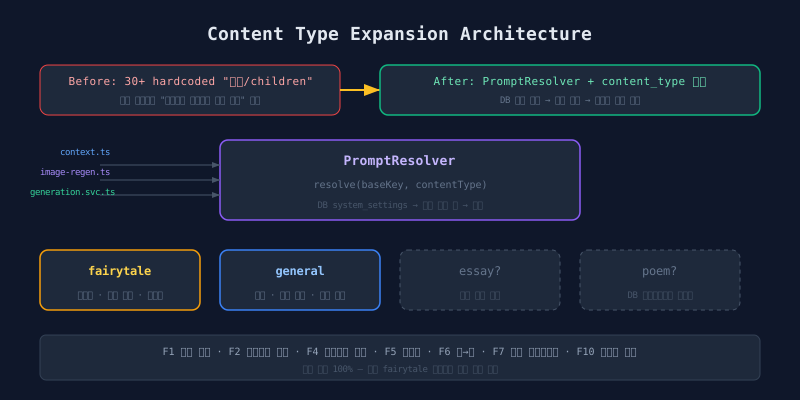
The Problem: “Fairy Tale” Hardcoded in 30 Places
The service launched as a children’s storybook creator. “fairy tale,” “children,” and “children’s book” were embedded in 30+ locations across the codebase. An adult essay generation request still received “use simple words children can understand.” The output was unusable.
| Hardcoded Location | Content |
|---|---|
| Scheduler context.ts | “Write a children’s fairy tale in JSON format…” |
| Scheduler image-regen.ts | “children’s book illustration” |
| Backend seed.ts | System prompts, evaluation criteria |
| Backend generation.service.ts | Fallback title “Generated Fairy Tale” |
| Backend prompt.routes.ts | “fairy tale sample,” “children’s content suitability” |
Every prompt, every fallback, every validation assumed a single content type.
Design Principles
Five rules governed the expansion.
| Principle | Application |
|---|---|
| 100% backward compatibility | content_type defaults to fairytale. Old code without changes produces identical behavior. |
| Follow existing patterns | Feature-based structure, Drizzle ORM, Express, Zod — no new paradigms. |
| Single source of truth | Prompts come from DB. Hardcoded fallbacks branch by type. |
| Gradual expansion | content_type is a text field. Adding essay, poem, novel needs no migration. |
| Minimal changes | Add columns to existing tables. Only one new table: writings. |
Content Type Definitions
| Value | Label | Audience | Vocabulary |
|---|---|---|---|
fairytale |
Fairy Tale | Children | Simple, educational |
general |
General | Adults | Unrestricted, free style |
Default is fairytale. Existing users notice zero change.
Core Architecture: PromptResolver
The Problem with Branching
Thirty locations, each with if (contentType === 'fairytale') ... else ..., doubles the code. Maintenance cost scales linearly with content types.
Solution: Central Prompt Interpreter
                    +--------------------+
 context.ts ------->|  PromptResolver    |
 image-regen.ts --->|                    |
 generation.svc --->|  resolve(key,      |--> app_config DB
 prompt.routes ---->|    contentType)    |--> fallback constants map
                    +--------------------+
PromptResolver unifies all prompt lookups through one entry point. It returns the appropriate prompt for the content type. DB first, fallback second.
// PromptResolver.resolve(baseKey, contentType):
// 1. Derive the settings key: base content type uses the base key,
//    other types append a type suffix (e.g., "key_general")
// 2. Look up the prompt in the app_config DB table
// 3. If found, return the DB value
// 4. Otherwise, fall back to a hardcoded prompt constant for that key + type
Fallback Prompts Map
The fallback map is a two-level lookup: prompt key, then content type. It covers writing system prompts (children’s vocabulary vs. unrestricted style), image generation prompts (children’s illustration vs. general illustration), and content evaluation prompts (child-safety criteria vs. general content filters).
When DB settings are missing, fallbacks keep the service running. A new content type can launch without seeding the database first.
DB Schema Changes
Existing Table Extensions
Three existing tables received new text columns: a content type field on both the contents and prompt templates tables, and an image type classification field on the characters table. All default to their original-behavior values (fairytale and person respectively). Rolling back requires reverting code only. The DB remains compatible.
New Table: writings
The writings table stores user-authored text drafts. Each record belongs to a user and captures a title, the text body, content type, and a status (draft or used). A reference to the resulting book tracks conversion when a writing becomes the basis for book generation. A JSONB metadata field provides flexibility for future extensions.
This enables a two-step workflow: write first, create a book later. The status flips from draft to used on conversion.
Feature Scope: F1 through F10
| # | Feature | Description |
|---|---|---|
| F1 | Content type selection | “Fairy Tale” / “General” picker in creation UI |
| F2 | Type-based prompt branching | PromptResolver auto-switches by content type |
| F3 | DB schema extension | contents.content_type column |
| F4 | Hardcoding removal | 30 locations converted to DB settings or type branching |
| F5 | Writing feature | Standalone text drafting and saving |
| F6 | Writing-to-book conversion | Saved writing becomes “situation” input for book generation |
| F7 | Auto character profiling | Extract visual profiles from generated text |
| F8 | Character image type classification | Auto-classify as person/landscape/object |
| F9 | Writing prompt type linking | Prompts categorized by content_type |
| F10 | Image mode | Spread (16:9) vs illustration layout selection |
F7: Auto Character Profiling
The multi-character system (previous post) requires admin-registered characters. F7 removes that dependency.
Text generation completes
    |
    v
Claude extracts character visual profiles from the text
    |
    v
{
  "Toto": "6-year-old girl, curly brown hair,
           large brown eyes, pink dress",
  "Mimi": "white rabbit, long ears, blue ribbon"
}
    |
    v
Profiles injected into image generation prompts
No registered characters needed. Claude reads the generated story, identifies characters, and produces visual descriptions. These descriptions feed into Gemini’s image prompts for consistency.
This works alongside the registered character system. Registered characters take precedence with their Claude Vision analysis. Auto-profiling fills the gap when users skip character selection.
Change Map
packages/db        -> schema extensions (columns, writings table)
        |
src/modules        -> generation validation, writings CRUD,
                      prompt type branching
        |
scheduler/src      -> PromptResolver, character-profiler,
                      image size branching
        |
web/src            -> content_type selection UI, writing feature
admin/src          -> prompts content_type field,
                      characters image_type badge
Every layer touches the content type. The PromptResolver centralizes the branching logic. Individual modules pass contentType as a parameter rather than making their own decisions.
Extensibility: The Core Design Goal
content_type is a text field. Adding a new type requires:
// Steps to add a new content type (e.g., "essay"):
// 1. Add fallback prompts for the new type
// 2. Optionally seed the config table with optimized prompts
// 3. Add the option in the content type picker UI
// -> Zero DB schema migration needed
The PromptResolver’s resolve(baseKey, contentType) pattern makes this work. Missing DB prompts fall through to hardcoded defaults. Teams can launch a new type with fallbacks, then iteratively optimize prompts in the database.
No enum migration. No new tables. No code deployment for prompt changes (DB-driven). The architecture absorbs new content types without structural modification.
Conclusion
Expanding from “fairy tale only” to “general creative platform” is not about adding if-else branches. It requires an abstraction layer — the PromptResolver — that routes prompts by type. It requires backward compatibility so existing users see no change. It requires a text-type field so future types need no migration.
Nothing changes for existing users. New possibilities open.