
From 9 Settings to 3 — Redesigning the AI Creation Page UX
 Jerome Na
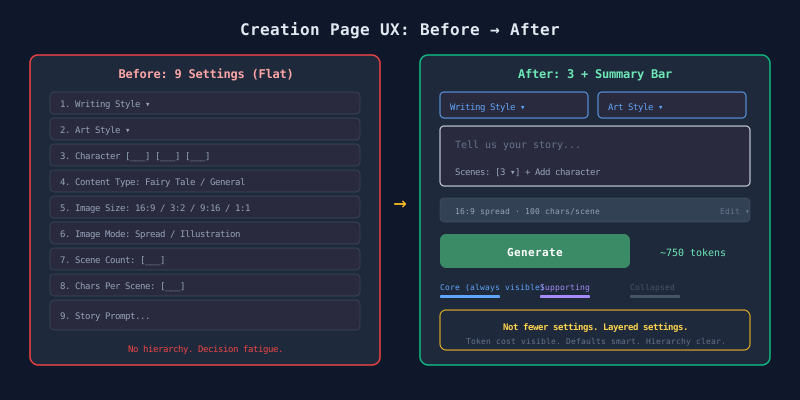
Nine settings, zero creations
The AI storybook creation page had nine settings. Writing style, art style, three character slots, content type, image ratio, image mode, scene count, characters per scene, story prompt. All listed at the same weight on one screen.
The problem was not the quantity. It was the lack of hierarchy.
The real question: not “show or hide” but “when to decide”
Three perspectives debated over five rounds. A Questioner, a Defender, and a Reframer.
The Questioner’s challenge
When a user decides to create, one thing is in their head: the story. “A puppy lost in the forest.” Before they write a single word, the page asks about image ratios, characters per scene, and image modes. Publishing-stage decisions demanded at the creative stage.
The Defender’s counter
This is a token-based paid service. Hiding settings means users spend tokens on unwanted results. Regeneration costs more tokens. “Change it later” is free-tier thinking.
The Reframer’s shift
“Too many settings” is not the problem. “All settings visible at the same time” is the problem. Successful generative AI products do not have fewer settings. They use Progressive Disclosure well.
Classifying the nine settings
Five rounds of dialogue produced a four-tier classification.
| Tier | Items | User behavior |
|---|---|---|
| Changes every time | Story prompt | Core input — largest space |
| Changes often | Writing style, art style | Dropdowns — visible but compact |
| Changes sometimes | Scene count, character | Supporting input — small, near prompt |
| Rarely changes | Image ratio, image mode, chars per scene | Summary bar — defaults are enough |
Content type (fairy tale / general) was removed as a standalone toggle. It is determined automatically when a writing style is selected. Nine becomes eight. What the user sees: 3 inputs + 1 summary line.
Token cost transparency is the prerequisite
Hide settings, but never hide cost. The generate button shows estimated token consumption in real time. Change the scene count, the estimate updates. Expand the summary bar and adjust character count, the estimate updates. Transparent cost builds trust in defaults.
The redesigned layout
┌──────────────────────────────────────────┐
│  [Writing Style ▾]      [Art Style ▾]    │  Core styles
├──────────────────────────────────────────┤
│  "Tell us your story..."                 │  Story prompt
│                                          │
│  Scenes: [3 ▾]   + Add character         │  Supporting
├──────────────────────────────────────────┤
│  16:9 spread · 100 chars/scene [Edit ▾] │  Summary bar
├──────────────────────────────────────────┤
│  [ Generate ]           ~750 tokens est. │  Submit + cost
└──────────────────────────────────────────┘
Changes
| Before | After |
|---|---|
| Content type toggle | Auto-determined by writing style |
| 3 character slots | “+Add character” inline link |
| Image ratio, mode, chars listed | Grouped into summary bar (collapsed) |
| Scene count in separate area | Below story prompt |
| No token estimate | Real-time display next to generate button |
| Dual pattern (Wizard + MainScreen) | Unified MainScreen |
Smart defaults
Defaults are determined in three tiers.
- System defaults — for first-time users
- Previous settings restored — returning users get their last configuration
- Plan constraints applied — values do not exceed plan limits
Fixed items (e.g., Start plan: 3 scenes locked) show a lock icon. No “Recommended” label. The value speaks for itself. A tooltip explains why it cannot be changed.
Takeaway
The solution is not fewer settings. It is layered settings. What changes every time gets the most space. What rarely changes collapses into a summary. Cost stays visible. This principle makes nine settings feel like three.
Full Socratic Dialogue (5 Rounds)
Agents: Questioner, Defender, Reframer — 5 Rounds
Current State (Before)
MainScreen had 9 settings at equal weight:
- Writing Style (dropdown)
- Art Style (dropdown)
- Character Selection (up to 3 + custom names each)
- Content Type (fairy tale / general toggle)
- Image Size (16:9, 3:2, 9:16, 1:1)
- Image Mode (spread / illustration toggle)
- Scene Count
- Chars Per Scene
- Story Prompt (textarea)
Round 1
Questioner (Round 1)
-
What is in the user’s head when they decide to create? Most users only have a situation in mind — the Story Prompt. Yet before they write a single word, the page demands publishing-stage decisions: image ratio, chars per scene, image mode. Does this match the user’s mental model?
-
Can users intuitively judge Scene Count and Chars Per Scene? Can a user predict what “150 characters per scene” produces? This is an expert setting, not a general user setting.
-
Why is Content Type a user choice? If the Writing Prompt already defines the style, content type should be metadata attached to the writing prompt, not an independent toggle.
Defender (Round 1)
-
Why publishing settings appear first: Agreed — image ratio and image mode are decisions about the output form, not essential at the ideation stage. But Scene Count is different. Scene count directly affects story structure (3-scene short story vs 10-scene adventure), so it must be decided before instructing the AI.
-
The case for Chars Per Scene: Acknowledged as an expert setting. However, this is a token-based billing service. Character count directly impacts token consumption, so cost-sensitive users need control. That said, providing defaults and hiding it behind an advanced toggle is reasonable.
-
Why Content Type is separate: Writing Prompts are filtered by content type, so technically content type must be selected first. But UX-wise, auto-determining content type when a Writing Prompt is selected is feasible — agreed.
Reframer (Round 1)
Both agents are focused on “which settings to cut,” but the question itself needs reframing.
Core reframe: The problem is not “too many settings” — it is “all settings visible at the same time with equal weight.”
ChatGPT, Midjourney, Canva — successful generative AI services do not have fewer settings. They excel at Progressive Disclosure.
For Storida:
- Pre-generation required: Story Prompt + Writing Style (the two core AI inputs)
- Pre-generation optional: Character, Art Style (visual preferences)
- Post-generation adjustable: Image Size, Image Mode, Scene Count, Chars Per Scene
The critical question: is “post-generation adjustable” technically feasible? Changing Scene Count requires regeneration, so is it truly “adjustable”?
Round 2
Questioner (Round 2)
-
Does “post-generation adjustment” work for Storida? This is a paid generation that consumes tokens. Changing Scene Count means regeneration = additional token cost. “Change it later” is free-tier thinking. In a paid service, users expect to get the right result on the first try. Could hiding settings actually be a “UX that wastes money”?
-
Default quality is the key, but defaults currently vary by plan. If defaults are good enough, users do not touch them. But current defaults change based on the user’s pricing plan. This blurs the meaning — are they “recommended values” or “maximum allowed values”?
-
Character selection ranges from 0 to 3, with “none” triggering AI auto-generation. Then why is Character selection on the main screen? Most new users will start without characters. Three empty slots on first impression add unnecessary complexity.
Defender (Round 2)
-
The tension between token cost and hidden settings: A critical point. Regeneration cost exists, so “change it later” is risky. But the counter-argument: nine visible settings cause Decision Fatigue and abandonment. A user who leaves without ever generating is a bigger loss than one who generates with defaults and adjusts next time.
Proposal: Show only core settings (Prompt, Writing Style, Art Style), but display estimated token consumption in real time. When advanced settings are opened and changed, the token estimate updates — solving the “hidden cost” problem.
-
Defining defaults: Defaults should be “optimal within the plan.” Start plan has 3 scenes fixed, so default = maximum. Basic and above should use “most popular choice” as the default.
-
Character slots: Agreed. Three empty slots are unnecessary complexity. Start with a single “+Add character” button. Click opens a selection panel.
Reframer (Round 2)
Questioner argues “token cost requires all settings visible.” Defender argues “decision fatigue requires hiding.” Both are valid, but the debate is trapped in a binary.
Reframe: The question is not “show or hide” — it is “when to decide.”
Alternative frame: 2-step flow
- Step 1 “What to make”: Prompt + Writing Style + Character (optional) → story content
- Step 2 “How to make it”: Art Style + Image Size + Image Mode + Scene Count + Chars Per Scene → story form
But how does this differ from the existing CreationWizard? The distinction is not splitting into steps — it is the classification criteria for what goes in each step.
Decision Point 1
Settings exposure strategy
| Agent | Position |
|---|---|
| Questioner | Hiding settings in a paid service causes users to waste tokens on unwanted results |
| Defender | Decision fatigue causes greater loss through abandonment; defaults + token estimate solves it |
| Reframer | Not show/hide — reclassify as “content decisions → form decisions” |
Options:
- A) Single screen + advanced toggle — show 3 core, rest behind toggle
- B) 2-step flow (content → form) — logical but one extra click
- C) Smart defaults + inline expansion — strong defaults for all items, individual edit buttons
→ Chose: C
Round 3
Questioner (Round 3)
-
What is the standard for “smart defaults”? First-time and tenth-time creation differ. First time needs “most universal value.” Repeat users need “previously used value” as the optimal default.
-
If “inline expand” buttons are on each of 9 items, isn’t that visual noise in a different form? Same complexity, different packaging.
-
What percentage of 9 settings do users actually change? We are designing UX without data.
Defender (Round 3)
- Smart defaults — 3-tier strategy:
- Tier 1 — System default (first-time user)
- Tier 2 — User history-based (localStorage: restore last settings)
- Tier 3 — Plan-optimized (reflect plan constraints)
- Solving visual noise — grouping:
- Always visible area: Prompt + Writing Style + Art Style + Character (4 core items)
- Summary Bar: remaining 5 items in one line —
"3 scenes · 100 chars · 16:9 spread · fairy tale"— click to expand - One edit entry point (summary bar click) minimizes noise
- Analytics events needed for usage data collection — acknowledged.
Reframer (Round 3)
Essential classification of settings:
| Category | Items | Nature |
|---|---|---|
| AI instruction | Prompt, Writing Style, Character | Creative intent — changes every time |
| Output format | Art Style, Image Size, Image Mode, Scene Count, Chars Per Scene | Production spec — set once, reuse |
| Meta classification | Content Type | Can be absorbed into Writing Style |
Absorbing Content Type into Writing Style: 9 → 8. Five “output format” items into summary bar. User sees 3 + 1 summary line.
However, Art Style is closer to creative intent than output format — it should stay in the core area.
Round 4
Questioner (Round 4)
-
Should Character selection be in the “core area”? If “none” is a valid default, it is optional expansion, not core. Three empty slots make the first impression complex for new users.
-
Can first-time users read the summary bar?
"3 scenes · 100 chars · 16:9 spread"— each item requires prior knowledge to understand. -
Scene Count placement: It is closely tied to Prompt. “A long adventure” needs more scenes; “a short bedtime story” needs fewer. Place it right below Prompt, and the summary bar contains only pure format settings.
Defender (Round 4)
-
Character compromise: “+Add character” link in core area, hidden by default. If user has ever used characters, auto-suggest previous ones.
-
First-time vs repeat users: Instead of two UIs, same UI with state-dependent defaults and exposure levels — first use: “suggested settings” label; repeat use: restore previous values.
-
Scene Count move: Agreed. Prompt + Scene Count as one group.
Reframer (Round 4)
Proposed layout:
┌─────────────────────────────────────────┐
│  [Writing Style ▾]    [Art Style ▾]     │  ← Core styles (2 dropdowns)
├─────────────────────────────────────────┤
│  "Tell us your story..."                │  ← Story Prompt (textarea)
│                                         │
│  Scenes: [3 ▾]  (+Add character)        │  ← Prompt supporting settings
├─────────────────────────────────────────┤
│  📐 16:9 spread · 100 chars  [Edit ▾]  │  ← Summary bar (click to expand)
├─────────────────────────────────────────┤
│           [ ✨ Generate ]               │  ← Submit + estimated tokens
└─────────────────────────────────────────┘
Decision Point 2
Character selection: position and default state
| Agent | Position |
|---|---|
| Questioner | A feature discovered by repeat users — remove from core area |
| Defender | A differentiating feature — maintain presence via “+Add character” link |
Options:
- A) Fully hidden — inside summary bar
- B) Inline link — “+Add character” text link near Prompt
- C) Conditional — show only if user has 1+ registered characters
→ Chose: B
Round 5
Questioner (Round 5)
-
If Writing Style absorbs Content Type, how should the dropdown display? Show all with tabs for fairy tale / general, or mix them?
-
The problem with the “Recommended” label: Start plan has 3 scenes fixed. Labeling it “Recommended” disguises a constraint as a suggestion.
-
Will both MainScreen and CreationWizard patterns be maintained after redesign?
Defender (Round 5)
-
Content Type integration: API level preserved, UI-only absorption. Writing Style dropdown uses internal tabs for fairy tale / general. Selection auto-sets content type.
-
Remove “Recommended” label: Show the value itself. Fixed items get a lock icon + tooltip (“3 scenes fixed on Start plan”).
-
Remove CreationWizard, unify to MainScreen: Eliminate dual-pattern maintenance cost.
Reframer (Round 5)
Core finding: The problem was never “too many settings.” It was “no hierarchy among settings.”
| Tier | Items | User behavior |
|---|---|---|
| Changes every time | Story Prompt | Core input — largest space |
| Changes often | Writing Style, Art Style | Dropdowns — visible but compact |
| Changes sometimes | Scene Count, Character | Supporting — small, near Prompt |
| Rarely changes | Image Size, Image Mode, Chars Per Scene | Summary bar — defaults suffice |
| Removable | Content Type (standalone toggle) | Absorbed into Writing Style |
Estimated token display is a mandatory prerequisite.
Synthesis
Established Facts:
- The 9-setting problem is hierarchy, not quantity
- Content Type can be absorbed into Writing Style (9 → 8)
- Scene Count placed near Prompt
- Character exposed as “+Add character” inline link
- Token cost transparency is the prerequisite for simplification
- CreationWizard and MainScreen dual pattern is a unification target
Open Questions:
- Writing Style dropdown: tabs for fairy tale / general vs mixed
- User history default storage (localStorage vs DB)
- Summary bar expand animation / layout
- Analytics event design
User Decisions Made:
| # | Decision Point | Choice | Rationale |
|---|---|---|---|
| 1 | Settings exposure strategy | C) Smart defaults + inline expansion | — |
| 2 | Character position | B) Inline link | — |
Actionable Output — Redesign Implementation Plan:
┌──────────────────────────────────────────┐
│  [Writing Style ▾]      [Art Style ▾]    │  Core style selection
├──────────────────────────────────────────┤
│  "Tell us your story..."                 │  Story Prompt (auto-height)
│                                          │
│  Scenes: [3 ▾]   + Add character         │  Supporting settings
├──────────────────────────────────────────┤
│  📐 16:9 spread · 100 chars  [Edit ▾]   │  Summary bar (collapsed)
│  ┌─ Expanded ────────────────────────┐   │
│  │ Image ratio: ◻16:9 ◻3:2 ◻9:16 ◻1:1│  │
│  │ Image mode: ◻Spread  ◻Illustration│  │
│  │ Chars/scene: [100]                │   │
│  └───────────────────────────────────┘   │
├──────────────────────────────────────────┤
│  [ ✨ Generate ]     est. ~750 tokens    │  Submit + token estimate
└──────────────────────────────────────────┘
Implementation items:
- Remove Content Type toggle → auto-determine from Writing Style selection
- Remove 3 character slots → “+Add character” inline link + popover
- Image Size, Image Mode, Chars Per Scene → group into summary bar
- Scene Count → move below Prompt area
- Real-time estimated token consumption display
- Smart default logic (system default → localStorage previous settings restore)
- Remove CreationWizard code, unify into MainScreen